


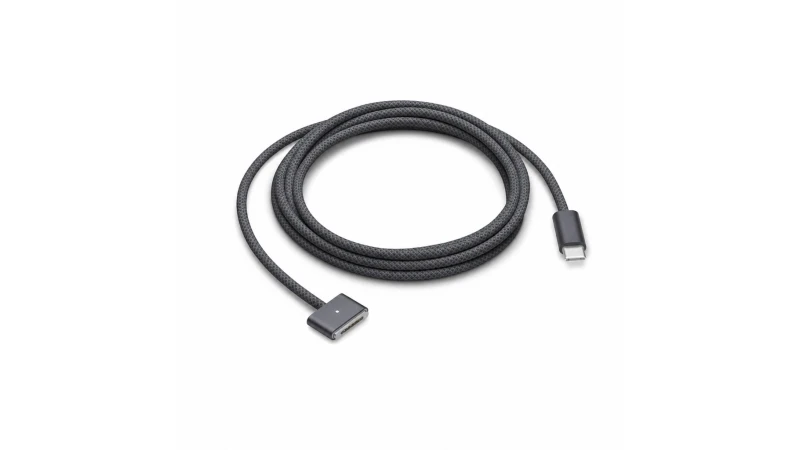
MacBooks last a long time. Their chargers, not so much. The cable starts fraying right where it meets the connector, the power brick starts running hot, and one day it just stops charging. It's the most common failure on a laptop that's otherwise working perfectly.
And then the fun begins: four different connector types, wattages from 29 to 140 W, and years where Apple was selling two incompatible families at the same time. Let's sort it out.
Already know what you need? Skip the guide and go straight there:
- Square magnetic connector, laptop from 2006 to 2012 → 45 W · 60 W · 85 W
- Wide, flat magnetic connector, 2012 to 2017 → 45 W · 60 W · 85 W
- USB-C ports only, 2015 to 2021 → 29 W · 65 W · 87 W
- Oval magnetic connector with LED, 2021 onwards → 2 m MagSafe 3 cable, in four colours
Not sure yet? Keep reading — you'll have it figured out in a minute, and the tables below list your exact model alongside the charger it needs.
First things first: look at the port, not the year
This is the one piece of advice that prevents most returns. Don't go by your laptop's year, because some years are traps. Go by what you can actually see.
- The cable comes straight out of the power brick and ends in a piece that snaps on magnetically → you have MagSafe first or second generation.
- The cable detaches from the power brick, with a USB-C plug on that end and a magnetic piece on the other → you have MagSafe 3 (2021 onwards).
- No magnetic piece at all and you charge through one of the oval ports → you have USB-C.
To tell first generation from second, look at the magnetic piece itself: MagSafe 1 is squarer and chunkier; MagSafe 2 is wider and noticeably flatter. The MagSafe 3 port is oval, has an LED and sits on the left side of the machine, level with the Esc key.
A mistake you'll see repeated all over the internet. You'll read that «MagSafe 1 is T-shaped and MagSafe 2 is L-shaped». That's wrong. Both the T shape and the L shape are first-generation MagSafe and fit the same port — Apple treats them as interchangeable. The T came first and the L arrived in 2010, but electrically and at the connector they're identical. What absolutely won't fit is MagSafe 1 in a MagSafe 2 port, or vice versa.
If you want the exact details
Click the Apple menu and go to «About This Mac»: it'll show you the model and serial number. On the bottom of the laptop, in small print next to the legal text, you'll also find a code starting with A followed by four digits (for example, A1278). That's the identifier the whole repair industry uses, and it's the most practical thing to search for when looking for parts.
How to read the wattage on a charger label
Flip the power brick over and find the Output line. Wattage is simply volts × amps. For example, a charger labelled 20 V, 4.25 A is an 85 W charger.
Watch out for this one — it's the most common mistake. On USB-C chargers you'll see several profiles separated by «or»: 20.3V/3A or 9V/3A or 15V/3A or 5.2V/3A. Those figures don't add up. The charger's power rating is the highest result in the list: in this case 20.3 × 3 = 61 W. Adding them all together gives a nonsense number, yet that's exactly the mistake that leads people to believe they have a more powerful charger than they actually do.
If the label has worn off — it happens to all of them eventually — there's a handy trick: hold down the Option key, click the Apple menu, then go to System Information → Power. It'll show you the wattage of whatever charger is currently plugged in.
MagSafe first generation (2006 – 2012)
Remember: the T and the L are the same family, so you just need to get the wattage right.
| Model | Years | Code | Power | Your charger |
|---|---|---|---|---|
| MacBook 13" polycarbonate (white/black) | 2006-2009 | A1181 | 60 W | 60 W charger → |
| MacBook 13" aluminium unibody | 2008 | A1278 | 60 W | 60 W charger → |
| MacBook 13" white unibody | 2009-2010 | A1342 | 60 W | 60 W charger → |
| MacBook Air 13" (early generations) | 2008-2009 | A1237 / A1304 | 45 W | 45 W charger → |
| MacBook Air 11" and 13" | 2010-2011 | A1370 / A1369 | 45 W | 45 W charger → |
| MacBook Pro 15" and 17" (all models of the era) | 2006-2012 | A1150, A1211, A1226, A1260, A1286, A1297… | 85 W | 85 W charger → |
| MacBook Pro 13" unibody (non-Retina) | 2009-2012 | A1278 | 60 W | 60 W charger → |
We stock all three wattages: 45 W, 60 W and 85 W.
MagSafe 2 (2012 – 2017)
| Model | Years | Code | Power | Your charger |
|---|---|---|---|---|
| MacBook Air 11" | 2012-2015 | A1465 | 45 W | MagSafe 2 45 W → |
| MacBook Air 13" | 2012-2017 | A1466 | 45 W | MagSafe 2 45 W → |
| MacBook Pro Retina 13" | 2012-2015 | A1425 / A1502 | 60 W | MagSafe 2 60 W → |
| MacBook Pro Retina 15" | 2012-2015 | A1398 | 85 W | MagSafe 2 85 W → |
All three here too: 45 W, 60 W and 85 W.
2012: the year that catches everyone out
This is the number-one cause of returns. In 2012, both families were on sale at the same time:
- MacBook Pro 13" and 15" without Retina (A1278, A1286) → MagSafe 1
- MacBook Pro Retina 15" (A1398) and MacBook Air (A1465, A1466) → MagSafe 2
There's an added complication: the MacBook Pro 13" A1278 — which takes MagSafe 1 — kept selling in the Apple Store until 2016. That's why so many people are convinced their «2015 Mac» needs a first-generation charger. MagSafe 1 and MagSafe 2 are not interchangeable, so check the connector before you order.
The USB-C era (2015 – 2022)
For a few years Apple dropped the magnetic connector entirely and everything charged over USB-C.
| Model | Years | Code | Original power | Your charger |
|---|---|---|---|---|
| MacBook 12" Retina (single port) | 2015-2017 | A1534 | 29 W | USB-C 29 W → (exact match) |
| MacBook Air Retina 13" | 2018-2020 | A1932 / A2179 | 30 W | USB-C 65 W → |
| MacBook Air (M1) | 2020-2021 | A2337 | 30 W | USB-C 65 W → |
| MacBook Pro 13" | 2016-2022 | A1706, A1708, A1989, A2159, A2251, A2289, A2338 | 61 W | USB-C 65 W → |
| MacBook Pro 13" (M2) | 2022 | A2338 | 67 W | USB-C 87 W → |
| MacBook Pro 15" | 2016-2019 | A1707 / A1990 | 87 W | USB-C 87 W → (exact match) |
| MacBook Pro 16" | 2019-2020 | A2141 | 96 W | USB-C 87 W — below the factory 96 W |
We stock 29 W — the exact match for the MacBook 12" — as well as 65 W and 87 W, which matches the MacBook Pro 15".
A straight-talking note on the MacBook Pro 16" from 2019-2020: its original charger is 96 W and our most powerful USB-C charger is 87 W. It will charge the machine, but it's below the factory spec, so under a heavy workload it may not be able to keep the battery topped up. If that's your model and you want full performance, you need a 96 W charger.
Two models that look like USB-C but aren't
These two trip people up all the time because they're from the same period:
- MacBook Air 2015-2017 (A1465, A1466): these take MagSafe 2 at 45 W, not USB-C.
- MacBook Pro Retina 2015 (A1502, A1398): also MagSafe 2, at 60 W and 85 W.
MagSafe 3 (2021 – 2026), the current generation
In 2021 Apple brought the magnetic connector back, but the business model changed with it: the charger is now a USB-C power adapter on one end and a separate cable on the other. They're sold separately.
| Model | Years | Factory power | Does it need 140 W? | Your charger |
|---|---|---|---|---|
| MacBook Air 13" (M2, M3, M4) | 2022-2026 | 30 W or 35 W | No — its real ceiling is around 70 W | MagSafe 3 cable → |
| MacBook Air 15" (M2, M3, M4) | 2023-2026 | 35 W (70 W option) | No | MagSafe 3 cable → |
| MacBook Pro 14" (M1 through M4, including Pro and Max) | 2021-2026 | 67, 70 or 96 W depending on config | No | MagSafe 3 cable → |
| MacBook Pro 16" (M1 through M4 Pro/Max) | 2021-2026 | 140 W | Yes | MagSafe 3 cable → |
Worth noting in that last column: across the entire current lineup, only the MacBook Pro 16" genuinely makes use of 140 W. Every other model charges perfectly well on less.
We carry the USB-C to MagSafe 3 cable in 2 metres in four finishes — white, space grey, midnight and sky blue — rated by the manufacturer for up to 140 W.
One thing MacBook Air owners particularly appreciate: since that machine only has two USB-C ports, charging via MagSafe 3 leaves both of them free. You also get the magnetic quick-release back, which is what the whole thing was invented for: if someone trips over the cable, it pops off instead of sending the laptop flying.
Important: MagSafe 1 and MagSafe 2 are not compatible with MagSafe 3. There is no adapter that bridges them. If your laptop is from 2021 or later, you need MagSafe 3 hardware — an old MagSafe charger in the drawer won't help.
Can I use a higher-wattage charger?
Yes, as long as it's a USB-C charger with USB Power Delivery and meets the relevant safety standards (CE marking, manufacturer or importer identified). On MacBooks that charge via USB-C, the laptop and charger negotiate voltage and current before any power is delivered: the machine takes only what it needs, and the charger doesn't «push» extra energy.
A lab measurement makes this concrete: a MacBook Air M4 connected to a 140 W charger drew 71,8 W — exactly the same as it drew from a 96 W charger. On the 30 W unit that ships in the box, it drew 28,9 W. The laptop asks; the charger doesn't dictate.
That said, there are four things worth knowing before you buy:
- More watts doesn't mean faster charging. Every model has a ceiling, and wattage above it simply goes unused. The benefit of a higher-rated charger is being able to power other devices from the same brick, not squeezing more speed out of your MacBook.
- The risk isn't in the wattage — it's in compliance. The real danger comes from uncertified or counterfeit chargers, where the negotiation protocol isn't reliable. In one study of 400 counterfeit Apple chargers, close to 99 % failed a basic electrical safety test.
- The cable is a limiting factor too. Above 60 W you need a USB-C cable with a 5 A e-marker chip. For 140 W it also needs to support USB PD 3.1; with an ordinary cable the charging speed caps itself automatically and you'll never know why.
- MagSafe 1 and MagSafe 2 don't negotiate. They run at fixed voltages, so with those you do need to get the right series and type. If you're not sure, drop us a message with your model and we'll tell you which one you need.
What about going too low? That causes real problems: very slow charging, no charging at all while you're working, or even a battery that drains despite being plugged in if you're editing video or compiling code. And be aware that the «slow charger» warning only appears on recent versions of macOS — on older versions it just charges badly and says nothing.
One more myth worth busting: plugging in two chargers at once doesn't speed anything up. A Mac charges through one port at a time.
Now the odd question: why can't you find these on Amazon?
If you've ended up here while looking for a compatible charger, you've probably already noticed: the big marketplaces have almost none, listings appear and disappear, and many sellers won't even name the connector. It feels like you're trying to buy something dodgy.
You're not. And it's worth understanding why, because it says a lot about how this market actually works.
Buying a third-party replacement part is completely normal
Nobody thinks twice about fitting wiper blades that didn't come from the dealership, buying a compatible ink cartridge, or using a case made by someone other than the device manufacturer. Chargers are exactly the same: you're perfectly entitled to buy a charger for your laptop that wasn't made by the laptop manufacturer, and whoever sells it can tell you which models it works with. Of course they can — otherwise there'd be no way to know if you were buying the right thing.
European law explicitly protects this. It allows the use of another brand's name when it's necessary to explain what your product is for, and it specifically mentions accessories and replacement parts. European courts have confirmed this repeatedly, in cases as everyday as compatible razor blades and independent garages advertising as specialists in a particular make of car.
The line is drawn somewhere else, and it's common sense: you can't pass your product off as the original. No logo, no typeface, no suggestion that the brand endorses you. That's why we always write «compatible with», never «type», «replica» or «Apple quality», and why we're upfront that this is not an Apple product.
So why do listings keep disappearing from marketplaces?
Here's where it gets interesting: what the law says and what a private company decides are two different things.
Amazon's written policy allows sellers to say «compatible with». But at the same time, its brand protection programmes give trademark holders the power to remove listings directly, without anyone first checking whether the complaint has any merit. Your product gets pulled; then you're welcome to prove you had every right to sell it. In the meantime, you're not selling.
There's a widely-discussed case in Amazon's own seller forums: an account suspended over a complaint about compatible chargers in which three of the five affected products didn't even use that connector. Didn't matter — the suspension came first.
The outcome is predictable. Faced with that kind of risk, plenty of sellers simply avoid the category, or list products with descriptions so vague you can't tell whether they'll fit. That's why you find chargers sold as «for laptop» with no indication of which one.
And there's something bigger — we didn't make this up
This isn't just platform policy: competition authorities have already sanctioned it.
In 2018 Apple and Amazon signed an agreement that effectively shut out around 90 % of independent sellers of Apple products. The CNMC — Spain's competition regulator — handed them a combined fine of 194 millones de euros in 2023, and in 2025 declared they hadn't even complied with what they'd been ordered to do. Italy's fine came to 173 millones.
In other words: when a perfectly legal product seems to «not exist» on the big platforms, it's usually not a legal problem. It's a competition problem that regulators have already penalised.
Good news, and it comes with a deadline. From 28 de abril de 2026, EU law requires that all laptops sold in the European Union must charge via USB-C. Proprietary connectors will be history. The market is opening up — not because the manufacturers wanted it to.
In the meantime, this is what specialist shops are for: we tell you exactly which models each charger fits, we issue a proper invoice and warranty, and if you order the wrong one we'll sort it out. Which is, in the end, all you should expect when buying a replacement part.
What we stock
We cover all four generations. Everything we sell is a compatible product, not manufactured by Apple, and we say so plainly: there is no Apple certification programme for laptop chargers or MagSafe 3 cables, so nobody — us included — can legitimately claim to be certified.
- MagSafe first generation: 45 W · 60 W · 85 W
- MagSafe 2: 45 W · 60 W · 85 W
- USB-C: 29 W · 65 W · 87 W
- MagSafe 3: 2 m cable in white, space grey, midnight and sky blue
- Accessories: UK plug adapter for older MagSafe chargers and a 2-metre USB-C cable
You'll find everything in laptop chargers, under laptops and accessories.
And if after reading all of this you're still not sure — which is entirely understandable, because the confusion was created by the manufacturer, not by you — just send us your laptop model or that code starting with A and we'll tell you exactly what you need. We'd much rather spend two minutes confirming it than process a return.